
Are WhatsApp International Calls Free? Complete 2026 Guide, Country Codes & Data Usage

Quick Answer: Are WhatsApp international calls free?
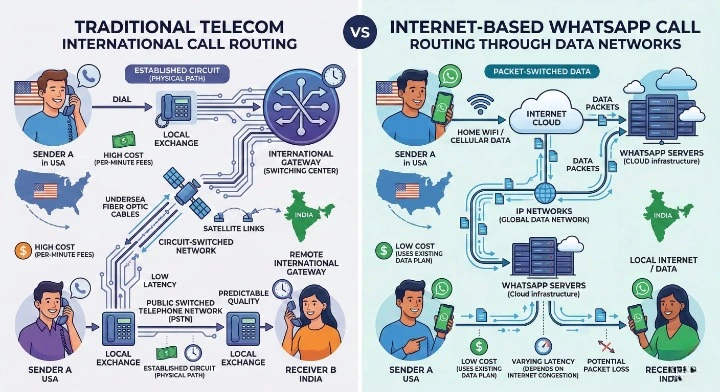
Yes. WhatsApp international voice and video calls are 100% free anywhere in the world. WhatsApp routes calls over the internet using Voice over IP (VoIP) rather than telecom carrier lines. There are zero long-distance charges or per-minute toll fees. As long as you are connected to Wi-Fi or have an active mobile data plan, calling someone overseas costs the exact same as texting someone locally: $0.00.
For decades, placing an international phone call was stressful. Traditional telecom carriers billed astronomical per-minute rates based on the geographical distance between countries. A 20-minute conversation with family overseas or an international business client could easily add $50 to $100 to your monthly phone bill.
Today, WhatsApp international calls have completely eliminated traditional long-distance phone charges for more than 3 billion active users worldwide. But while the app itself is 100% free, hidden traps like carrier cellular roaming charges, missing '+' country codes, and foreign VoIP government blocks (such as in Dubai and Qatar) catch millions of callers off guard every day.
In this comprehensive 2026 guide, you will learn exactly how WhatsApp international calls work, how to dial any international number correctly, how much data voice and video calls consume, how to avoid unexpected roaming bills while traveling, and what to do if calls are blocked in your destination country.
Estimate your exact bandwidth consumption and check carrier roaming risk before placing international calls.
Are WhatsApp International Calls Really Free?
The short answer is yes, 100% free. WhatsApp does not charge subscription fees, per-minute toll rates, connection fees, or international surcharges when you call someone in another country.
Whether you are calling from New York to London, Mumbai to Dubai, or Sydney to Toronto, WhatsApp treats all voice and video calls identically: as digital internet data packets.
The Single Catch: Your Internet Connection
While WhatsApp charges zero dollars, your phone must be connected to the internet to place the call:
- Over Wi-Fi: The call is completely free. It uses zero mobile cellular data and generates zero phone charges.
- Over Local Mobile Data (4G/5G): The call consumes a tiny fraction of your monthly cellular data allowance (approximately 0.4 MB per minute for voice). If you have an unlimited data plan or plenty of gigabytes remaining, there is no extra charge.
- Over International Roaming: If you are physically traveling in a foreign country and using your domestic SIM card on cellular data without an international roaming pack, your cellular carrier will bill you for international data consumption. (We show you how to prevent this in Section 8 below.)
How WhatsApp Calls Work (VoIP vs Traditional Phone Calls)
To understand why WhatsApp international calls cost nothing while telecom carrier calls cost a fortune, consider how the underlying technology operates:
| Feature | Traditional Carrier Phone Calls | WhatsApp International Calls |
|---|---|---|
| Underlying Technology | Public Switched Telephone Network (PSTN) | Voice over Internet Protocol (VoIP) |
| Cost Model | Billed per minute based on geographic distance ($0.50 – $3.00+/min) | 100% Free ($0.00) over internet data connection |
| Audio & Video Quality | Narrowband analog voice (8 kHz audio sampling) | Opus Wideband HD Voice (16–48 kHz) + 720p HD Video |
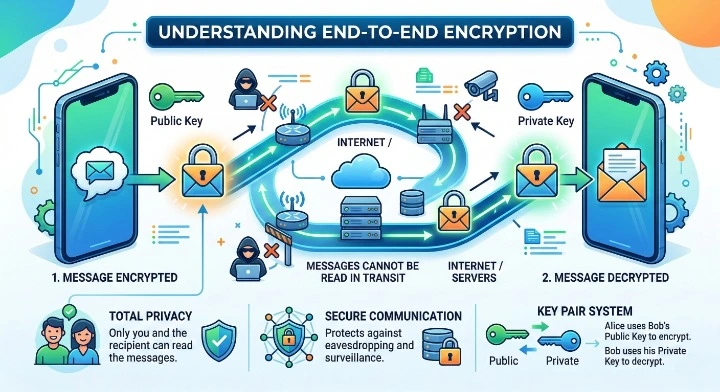
| Security & Privacy | Carrier wiretappable; unencrypted telecom lines | End-to-end encrypted via official Signal Protocol |
| Hardware Supported | Cellular phone / Landline only | Smartphones (iOS/Android), Tablets, Desktop App (Windows/Mac) |
| Cross-Border Billing | Inter-carrier settlement toll rates applied | Zero international transit fees |
When you place a standard carrier phone call, your voice travels across submarine telecom cables and international routing switches controlled by multiple overseas phone companies. Each carrier takes a cut of the per-minute billing.
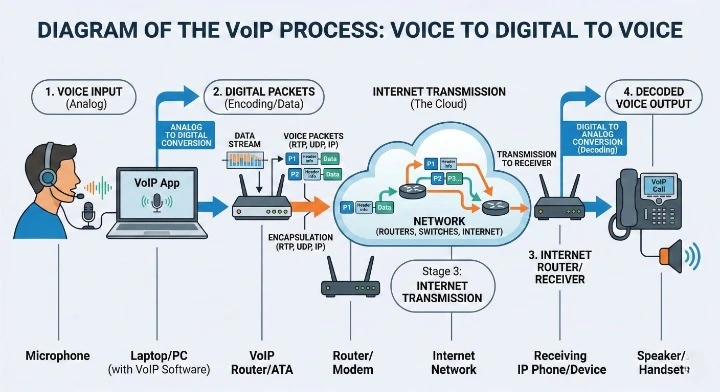
In contrast, WhatsApp VoIP technology slices your voice into compressed digital packets, secures them with 256-bit end-to-end encryption, and beams them across standard internet routing paths directly to the receiver's device. Distance ceases to exist as a billing factor.

How to Make a WhatsApp International Call (Step-by-Step SOP)
The number one reason users fail to connect on WhatsApp internationally is formatting the telephone number incorrectly. Unlike local numbers, international contacts require full E.164 telecommunication formatting.
Step 1: Long-Press '0' to Type the Plus Sign (+)
Open your smartphone contacts or WhatsApp dialer. When entering an international number, always begin with a plus symbol (+). On virtually all iPhone and Android keyboards, you generate the + sign by pressing and holding down the 0 key for one second.
Step 2: Enter the Destination Country Code
Immediately following the + sign, enter the international country calling code of the person you are contacting. Never insert spaces, brackets, or hyphens between the + and the country code.
- United States & Canada:
+1 - United Kingdom:
+44 - India:
+91 - United Arab Emirates (UAE):
+971 - Australia:
+61
Step 3: Remove Any Leading Zero (0) from the Local Number
This is the most critical mistake callers make. In many nations (including the UK, India, Australia, Germany, and South Africa), local numbers begin with a domestic trunk prefix of 0. When dialing internationally, you must delete the leading zero.
Example 1 (UK Mobile):
Local number in London:07911 123456
Correct WhatsApp international format:+447911123456(Remove the first 0)Example 2 (Australian Mobile):
Local number in Sydney:0412 345 678
Correct WhatsApp international format:+61412345678(Remove the first 0)
Step 4: Save Contact and Initiate Call
Save the contact in your phone address book. Open WhatsApp, tap the New Chat or Calls tab, search for the contact, and tap the Phone icon (for voice) or Camera icon (for video).
Interactive WhatsApp Number Formatter & Call Tester
Use this interactive tool to format any international number, strip any invalid trunk zeros automatically, and verify your dialing link before placing the call:
Select destination country and enter any local phone number. The tool automatically removes trunk zeros, formats the E.164 international code, and generates a direct link to test calling in WhatsApp.
Top 25 International Country Codes Reference Table
Use this verified reference table to quickly locate the correct dialing code and formatting rules for the most common global destinations:
| Country | Country Code | Leading 0 Dropped? | Formatted Dialing Example |
|---|---|---|---|
| United States / Canada | +1 |
N/A (No trunk 0) | +1 212 555 0199 |
| United Kingdom | +44 |
Yes (Drop 0) |
+44 7911 123456 |
| India | +91 |
Yes (Drop 0) |
+91 98765 43210 |
| United Arab Emirates (UAE) | +971 |
Yes (Drop 0) |
+971 50 123 4567 |
| Saudi Arabia | +966 |
Yes (Drop 0) |
+966 50 123 4567 |
| Australia | +61 |
Yes (Drop 0) |
+61 412 345 678 |
| Germany | +49 |
Yes (Drop 0) |
+49 170 1234567 |
| France | +33 |
Yes (Drop 0) |
+33 6 12 34 56 78 |
| Pakistan | +92 |
Yes (Drop 0) |
+92 300 1234567 |
| Nigeria | +234 |
Yes (Drop 0) |
+234 802 123 4567 |
| Philippines | +63 |
Yes (Drop 0) |
+63 917 123 4567 |
| South Africa | +27 |
Yes (Drop 0) |
+27 82 123 4567 |
| Singapore | +65 |
N/A (No trunk 0) | +65 9123 4567 |
| Malaysia | +60 |
Yes (Drop 0) |
+60 12 345 6789 |
| Brazil | +55 |
Yes (Drop carrier code + 0) |
+55 11 91234 5678 |
| Mexico | +52 |
Yes (Drop 01/044/045) |
+52 1 55 1234 5678 |
| Spain | +34 |
N/A (No trunk 0) | +34 612 345 678 |
| Italy | +39 |
NO (Keep 0 for landlines) |
+39 347 123 4567 |
| Netherlands | +31 |
Yes (Drop 0) |
+31 6 12345678 |
| Qatar | +974 |
N/A (No trunk 0) | +974 5512 3456 |
| Kuwait | +965 |
N/A (No trunk 0) | +965 9123 4567 |
| Bangladesh | +880 |
Yes (Drop 0) |
+880 1712 345678 |
| New Zealand | +64 |
Yes (Drop 0) |
+64 21 123 4567 |
| Ireland | +353 |
Yes (Drop 0) |
+353 87 123 4567 |
| Kenya | +254 |
Yes (Drop 0) |
+254 712 345678 |
WhatsApp Call Data Consumption: Voice vs Video
If you are calling on a limited mobile cellular plan or using an international travel eSIM, tracking bandwidth consumption is essential. Here is the real-world measured data usage of WhatsApp calls:
| Call Mode | Data per Minute | Data per 15 Minutes | Data per 1 Hour | Audio / Video Codec |
|---|---|---|---|---|
| Voice Call (Standard Quality) | ~350 KB – 500 KB | ~6 MB | ~24 MB – 30 MB | Opus Wideband (32 kbps) |
| Voice Call (Low Data Mode Enabled) | ~200 KB – 280 KB | ~3.5 MB | ~14 MB – 17 MB | Opus Narrowband (16 kbps) |
| Video Call (Standard SD - 480p) | ~4.0 MB – 5.5 MB | ~70 MB | ~270 MB – 330 MB | H.264 / VP8 (Adaptive) |
| Video Call (High Definition - 720p) | ~15 MB – 25 MB | ~280 MB | ~900 MB – 1.5 GB | H.264 Hardware-Accelerated |
Key Takeaway: A standard 1-hour WhatsApp voice call consumes only about 25 MB of data. You can talk for 40 hours on a single 1 GB data plan! However, 1 hour of HD video calling can burn through 1.5 GB rapidly.
How to Enable Low Data Mode for Calls
If your internet connection is slow or your cellular gigabytes are precious, WhatsApp includes an integrated setting that cuts voice call data usage by up to 45% without noticeable voice degradation.
How to turn it on (iPhone & Android):
- Open WhatsApp on your device.
- Navigate to Settings (Gear icon on iOS, three vertical dots > Settings on Android).
- Tap on Storage and Data.
- Locate the Network sub-section.
- Toggle on "Use less data for calls".
Once toggled, WhatsApp dynamically throttles audio bitrates during cellular calls, ensuring clear voice transmission even on weak 2G and 3G networks.
Traveling Abroad: 5 Golden Rules to Avoid Roaming Bills
The biggest pitfall for international travelers is assuming that because WhatsApp is free, using it overseas is automatically free. If your domestic SIM card has Data Roaming turned ON without a carrier travel pass, your mobile provider will bill you exorbitant roaming data rates (sometimes $5.00 to $15.00 per megabyte!).
Follow these 5 proven rules whenever you travel overseas:
- Use Hotel & Airport Wi-Fi: Whenever connected to hotel, cafe, or airport Wi-Fi, WhatsApp calls are 100% free. You can even toggle Airplane Mode ON and then turn Wi-Fi back ON to ensure your carrier antenna is completely powered down.
- Turn OFF "Data Roaming" in Device Settings: On your iPhone (Settings > Cellular > Cellular Data Options > Data Roaming OFF) or Android (Settings > Connections > Mobile Networks > Data Roaming OFF). This prevents background mobile apps from using roaming towers.
- Buy an Inexpensive Travel eSIM: Instead of paying your domestic carrier $10/day for international roaming, install a digital travel eSIM (such as Airalo, Holafly, or Nomad). You get 5 GB to 10 GB of high-speed local data for $10 to $20. WhatsApp will continue using your original phone number seamlessly without any re-registration.
- Disable Automatic Media Downloads: Go to WhatsApp Settings > Storage and Data > When using mobile data, and uncheck Photos, Audio, Videos, and Documents. This stops group chat media from burning through your travel data.
- Activate "Use Less Data for Calls": Keep the low data setting enabled throughout your international trip.
Countries Where WhatsApp Calls Are Blocked & Workarounds
In several countries, national telecommunication authorities block or restrict Voice over IP (VoIP) calling to protect state-owned telecom revenues or enforce state surveillance laws. While WhatsApp text messaging usually works fine, voice and video calls will fail to ring or connect.
| Country / Region | WhatsApp Calling Status | Official Reason & Workaround |
|---|---|---|
| United Arab Emirates (Dubai & Abu Dhabi) | Voice & Video Calls Blocked | Regulated by TDRA to protect Etisalat and du monopolies. Travelers use government-approved apps like Botim or Voico, or access secure corporate Wi-Fi VPN networks. |
| Qatar | Calls Intermittently Throttled | VoIP traffic managed by Ooredoo and Vodafone. Wi-Fi connections often allow calls while mobile data blocks them. |
| China | Completely Blocked | WhatsApp servers blocked by the Great Firewall. Domestic users rely on WeChat; foreigners require pre-installed international roaming SIMs. |
| Saudi Arabia | Voice Works; Video Throttled | CITC relaxed general voice restrictions, but high-bandwidth video packets may experience connection timeouts. |
| Oman | VoIP Calling Restricted | Telecommunication authorities limit unapproved VoIP services. Text messaging operates normally. |
Traveler Solution: If traveling to Dubai or Doha, you will still receive WhatsApp text messages, photos, and voice notes. If voice calls are essential, switch to hotel Wi-Fi networks configured with enterprise routing or communicate via short WhatsApp voice notes, which operate smoothly even under strict VoIP filters.
Can You Call Landlines or Non-WhatsApp Numbers?
A frequent question is whether WhatsApp can dial a traditional landline telephone, an airline customer service 1-800 number, or a friend who does not have WhatsApp installed.
The answer is no. WhatsApp uses an app-to-app closed VoIP ecosystem. For a WhatsApp call to connect, both parties must meet three conditions:
- Both caller and recipient must have an active WhatsApp account.
- Both devices must be connected to the internet (Wi-Fi or cellular data).
- The recipient must not have blocked the caller.
If you need to dial a traditional physical landline or a feature phone without internet access in another country, you cannot use WhatsApp. In those instances, you must use carrier international calling services, Skype Out, or dedicated VoIP dialers.
Stop Calling Cold Leads Manually on WhatsApp
Calling international prospects unexpectedly leads to customer complaints and account bans. Instead, use Waplify to send automated WhatsApp broadcasts, trigger 24/7 AI chatbot replies, and convert global leads effortlessly from one multi-agent shared inbox.
WhatsApp Calling for Business: Personal Calling vs Waplify Platform
If you are a business owner, agency, or e-commerce merchant dealing with international clients, relying on standard WhatsApp voice calls creates severe operational bottlenecks:
1. The Risk of Account Bans
If you initiate unsolicited WhatsApp voice calls to numbers that haven't explicitly saved your company contact, recipients will tap "Report & Block". Accumulating spam reports will trigger Meta's automated safety systems, permanently disabling your phone number.
2. Lack of Call Recording & CRM Sync
Personal WhatsApp voice calls cannot be natively recorded, logged into Salesforce or HubSpot, or monitored for quality control by management. When team members conduct sales on personal phones, client history is lost.
3. The Modern Solution: Asynchronous Lead Qualification via Waplify
High-growth global businesses don't cold-call leads. Instead, they use Waplify to build an automated, conversion-optimized international pipeline:
- Official WhatsApp Business API: Send bulk broadcast campaigns to tens of thousands of international buyers with zero ban risk.
- Click-to-WhatsApp Ads & Website Triggers: Prospects click a link on your website or social media and instantly open a verified chat.
- AI Chatbots & Instant Autoresponders: Automatically qualify customer requirements, answer FAQs in multiple languages 24/7, and schedule voice consultations.
- Multi-Agent Team Inbox: Your entire sales and support staff can collaborate, tag conversations, and close deals from a unified desktop dashboard.
Frequently Asked Questions (FAQs)
Are WhatsApp international calls completely free?
Yes. WhatsApp does not charge any toll fees, subscription costs, or per-minute rates for international calls. Because calls travel over the internet via Voice over IP (VoIP), calling someone overseas is completely free as long as you are connected to Wi-Fi or have an active mobile cellular data plan.
Does the person receiving an international WhatsApp call have to pay?
No. The recipient never pays long-distance toll charges. Unlike traditional telecom carrier collect calls or roaming calls, receiving a WhatsApp call is completely free. The receiver only uses their normal internet connection (Wi-Fi or mobile data).
Do WhatsApp international calls show up on my carrier phone bill?
No. WhatsApp calls do not appear as dialed phone numbers on your cellular carrier statement or itemized monthly bill. Your carrier only sees encrypted internet data traffic. The phone numbers and names of people you call remain private inside your WhatsApp call logs.
Why is my WhatsApp call not connecting internationally?
The most common reasons are: (1) dialing an incorrect country code or forgetting to drop the leading zero, (2) the contact has not saved your number or is not on WhatsApp, (3) weak internet connectivity, or (4) the call is originating from or destined to a country with strict VoIP restrictions, such as the UAE (Dubai), Qatar, or China.
How much data does a 1-hour WhatsApp international call use?
A standard WhatsApp voice call uses approximately 18 MB to 30 MB per hour. In "Low Data Usage" mode, it consumes only about 12 MB to 18 MB per hour. Video calls consume substantially more: approximately 270 MB per hour for standard definition (480p) and up to 1.5 GB per hour for high definition (720p).
Can I call a landline or traditional telephone with WhatsApp?
No. WhatsApp operates strictly on an app-to-app VoIP protocol. Both the caller and the recipient must have the WhatsApp application installed on an active smartphone, tablet, or computer. WhatsApp cannot place calls to traditional landlines, office PBX lines, or mobile phones without the app.
Does WhatsApp international calling work while on airplane mode?
Yes. If you turn on Airplane Mode and then manually turn on Wi-Fi and connect to a local wireless network (such as at a hotel, airport, or cafe), WhatsApp international calling will work seamlessly with 100% protection against carrier roaming fees.
Can businesses use WhatsApp international calls for customer sales?
While you can place voice calls from a WhatsApp Business app, calling international leads unexpectedly often leads to spam reports and number bans. Professional global companies use platforms like Waplify to send automated WhatsApp broadcasts, share Click-to-Chat links, and qualify leads via 24/7 AI chatbots before initiating calls.